All posts by caram604

Project Ideas for LEDs and 3D Prints

My partner and I are brainstorming about projects we could make with a 3D design that uses LEDs:

1) Light up plate

2) Light up glasses

3) Light up jewelry

4) Light up hat

5) Light up phone charger

6) Light up chair

7) Light up phone case


Top 4 Table Ideas: 

1) Light up phone case

2) Light up translucent ball

3) Light up alarm clock (numbers of hours light up)

4) Light up charger (color changes based off phone percentage)


Combined Class List: 

1) LED Lamp

2) Light up jewelry box (when opened)

3) Light up ball (triggered when thrown)

4) Glasses with lights (triggered by blinking)

5) Light up clock where numbers light up

6) Light up charger (changes based on battery level)

7) Light up phone case

8) Computer skin that lights up

9) Light up watch

10) Toy car with lights

Illumination Station!!

Our latest Art & Design project was LED it Up! where we learned how to make assorted LED lights turn on by creating circuits with breadboards, coin batteries, wires, switches, and resistors. We first were taught how to make a simple circuit by holding an LED to a coin battery. In doing this, we learned to line up the positive side of the coin battery with the negative side of the LED and vise versa. Next, things got a little more complicated when we added a switch to the mix. In the next video, we learned how to make the LED light up by using a switch, coin battery, and wires. First, we snapped the coin battery into a coin battery holder, and attached a wire to the metal hole on each side. Then to one wire, we attached a switch, and to the other, we placed a “female” wire. To the switch, we added another wire and to the wire, we added another “female” wire. To the “female” wires, we inserted the LED light. Lastly, we flipped the switch, and the LED was illuminated. coin battery circuit

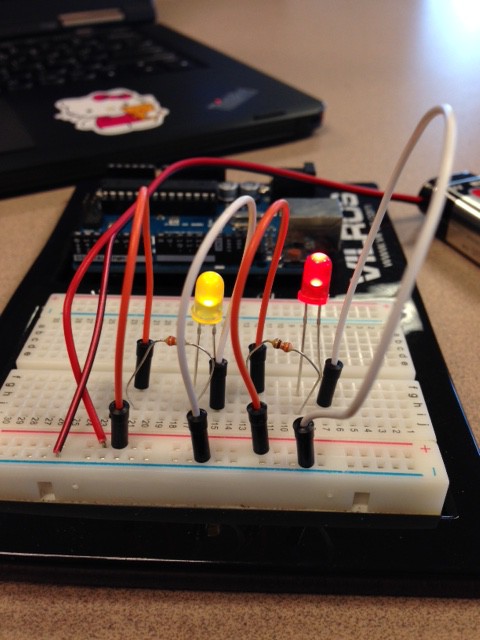
The third thing I learned was how to make an LED light up by using a breadboard, 9 volt battery, and resistors. We attached the battery to its corresponding positive/negative row. Resistors were connected to the battery by wires, and the LED was connected to the resistor by other joining wires. Overall, these projects were very interesting to complete, and the videos were very helpful. Though some troubleshooting was required, it was very exciting to see the LED light up when you were able to complete the circuit correctly.

breadboard resistor circuit

The Greatest USwag-B Holders

For our makerspace design, we thought there was a dire need for hooks to hold the USB’s. First, we hand-drew three different designs to ensure we had the best, most useful model. Next, in order to make our design sturdy, we measured the dimensions for our hook so that it wouldn’t be fragile and break. Then, we transferred our design into Sketchup and applied our decided measurements to the software. Now that the hook was 3-Dimensional and our measurements were to scale, we were able to export it to an .stl so that it could be 3D printed. In our end result, we achieved a durable, yet sleek design that can now be used daily in the makerspace.

usb holder 2d

Learning Sketchup

In Art & Design class, I was taught how to use Google Sketchup, a 3D software in which we made chairs and a table. Though at times it was frustrating, it was very cool to see the finished product of what we had created.  We were able to take something like a simple dining set, and make it into our own, unique design.

dining room post